How we test PitCrew in production with browser agents.
PitCrew is used by firms who are managing serious money from $100M to $10B in customers money and rely on our agents to automate their reconciliation, onboarding and much of their operations workflows. This puts us as an engineering team in a pickle where each and every change we ship has to leave the core flows working exactly how they were before the change. An agent run should still complete, a collection should still answer questions about its documents, and all the integrated systems should still give the data seamlessly. Our team checked all of that by hand, but they have to do it again after every single change.
We wanted two things. First, how can we run checks without a person at each step. Second, the result of these checks had to be the ones we could trust.
The first has become easy now with AI agents that can drive a browser. The second is where it gets interesting, because an AI can't consistently tell you if a task worked and when it did not.
The AI clicks. Code decides.
That is how we designed the system the whole design in four words. Everything below is how we made it hold up.
AI Doesn't Get a Vote
Models are now good at using software they have never seen. We can show one a screenshot and a goal, and it will find the relevant button to click.
Asking the same model whether the task worked is a different job. Did the run actually complete? Did the data land in the correct system? The model only knows what the page looked like when it stopped. In a test, a wrong "yes" is the worst error there is and we wanted our testing suite to be free of these false positives.
In AI on Rails we argued that every agent action must be observable, reviewable, and defensible after the fact. A test suite that takes an AI's word for its own results fails that standard. So the AI does the work, and something it cannot influence checks the result.
Why a Browser Agent, Not a Test Script
There are two ways to make a browser click through your app: a test script that you write step by step in code, or a browser agent that you give a goal in plain English.
| Test scripts | Browser agents | |
|---|---|---|
| Examples | Playwright, Selenium, Puppeteer, Cypress | browser-use, Stagehand, Skyvern |
| How you write a test | In code: click #start-run, then type into input[name=search] | In plain English: open the agent named X and press Start run |
| Who picks each click | The script, step by step | A model that reads the page and picks the next action |
| When the UI changes | Breaks when a selector or label changes | Usually copes, because it finds the button by what it means |
| Same input, same result? | Yes, every time | Not guaranteed |
The last row is the catch. A browser agent keeps working when a button moves, but it can take a different path on each run, and it can say it succeeded when it didn't. So we use the agent for the one thing it is good at, finding its way through a changing UI, and keep everything else in plain code: signing in, blocking unsafe changes and deciding pass or fail. If you build this for your own product, that split is the part to copy.
Our Suite Follows the Same Rules as Our Product
Our test suite works on the same principles we codified for our agents which run on client firms. Namely:
| In client firms | In our tests |
|---|---|
| The firm's rules decide what an agent may touch. | Each test lists the changes it may make. Code blocks everything else before it reaches PitCrew. |
| Someone other than the agent signs off. | Code, not the AI, decides pass or fail, by reading PitCrew directly. |
| Every Agent run is on record. | Every step is kept: what the AI saw, whether its last step worked, and its next goal. A failure reads step by step. |
These rules are what let us test on the live app, with a dedicated test account. They are also why a small model is enough. Our tester runs on Gemini 3.8 Flash, as it only has to operate the page.
The Building Blocks for the Test Suite
The examples use four parts of PitCrew. Any product will have its own equivalents:
- Agent: a worker that handles one workflow end to end, such as flagging cash shortfalls in client accounts.
- Run: one execution of an agent on one set of inputs. A bulk run starts many runs at once.
- Collection: a store of a firm's documents, rules and records that people and agents can ask questions of.
- Garage: the integration hub, where connections to other systems such as Gmail and Google Sheets live.
The test suite adds only three words of its own:
- Test: one task in plain English, with the steps, the inputs, the changes allowed, and the checks that decide pass or fail. Example: upload a positions file to an agent and start one run.
- Check: one yes/no question that code asks after the AI is done. Example: "Did the run complete?"
- Cloud job: a group of tests saved in Google Cloud and started with one command. Tests in a group share one signed-in browser and run one after another. Example: the "single + bulk runs" job, which runs the single-run and bulk-run groups back to back.
If you remember one thing: people write tests, and code handles everything around them.
Anatomy of a Test Run
A test run has seven steps in three phases. The AI does exactly one of them.
Set up, once per run (code). Open a fresh Chrome browser in the cloud, with nothing left over from earlier runs. Sign in to the test account. Then run a pre-flight check: is PitCrew up, and does every agent we're about to test exist? This step only looks. It changes nothing.
Run each test (code, then AI, then code). Open a new tab and switch on the guard. Let the AI follow the test. Then check the result.
Report, once per run (code). Send a summary to Google Chat and save every step for review.
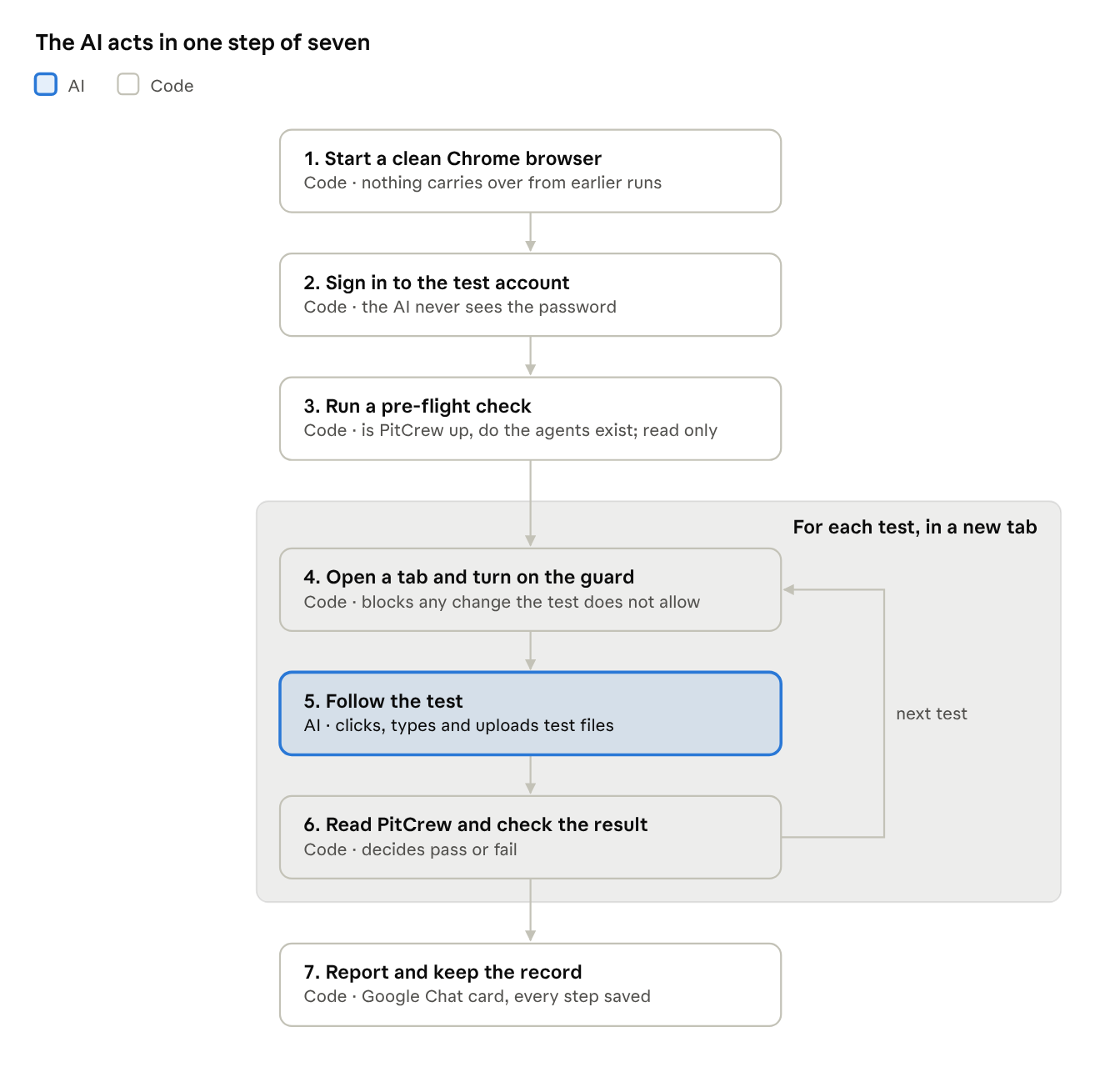
Steps 4 and 6 are where the rules from the table live. The guard goes up before the AI acts, and the check runs after it stops.
Four Design Decisions
Most of the engineering went into four choices.
Decision 1: We give the AI the Menu, Not Just a Picture
The problem: from a screenshot alone, a model has to work out what on the page is clickable before it can decide what to click.
What we built:
- Two views per step. At every step the model gets a screenshot and a numbered list of the buttons and fields on the page. It picks what to press from the list.
- Up to 3 actions per step. Enough to fill a field and press a button in one go.
- Private thinking. Before each step the model reasons privately, at Gemini's default thinking level. Minimal, low, medium and high are the other settings.
- A note per step. The system keeps a short note for every step: what the AI saw, whether its last step worked, and its next goal. When a test fails, you read the failure step by step instead of guessing.
Decision 2: Putting a Guard Between the AI and the Live App
The problem: the tests run on the live app, in a signed-in browser. An agent that misreads a page could steer away from the test criteria, especially with updates to the product.
What we built:
- Allowed changes, declared per test. Each test lists the only changes it may make, such as "start one run of this agent".
- Blocked before it lands. Code switches the guard on in each new tab before the AI acts. The guard sees every request the page sends, and stops any change the test does not allow before it reaches the server.
- Some changes are never allowed. Deletes, disconnects and sign-outs are blocked in every test, whatever the test declares.
- The AI never holds credentials. Deterministic code signs in to the test account. The login and the model's API key live in Google Secret Manager, never in the AI's context and never on an engineer's laptop.
- Everything is recorded. Every request, click and pop-up is logged next to the AI's step notes. When a test fails, that record is the evidence.
- Tests clean up after themselves. Anything a test creates, such as a run, a collection or a file, gets a "QA auto" prefix, and code deletes it at the end of the run.
Decision 3: Code Checks the Result, Not the AI
The problem: an AI that has just finished a task is a poor judge of whether it worked. We needed a referee that doesn't depend on its opinion.
What we built:
- Code looks at the evidence. Once the AI stops, code goes back to PitCrew and inspects the outcome itself. Did the run finish? Did the new row appear in the Google Sheet? Does the page show the text it should?
- Planted values. Some checks plant a value first, such as a code word in an email, and pass only if that exact value comes back. The worked example below shows one.
- A library of 43 checks. Each check answers one yes/no question, such as "the run completed", "our mock server received the agent's call" or "the page shows this text". Test writers pick the ones they need, like ticking boxes on a form.
- Slow runs don't hold up the queue. Some agent runs take minutes. The suite starts the next test and comes back to check the slow run at the end.
- Build a check once, use it everywhere. When a test needs to verify something new, such as a new page or a new kind of result, an engineer adds one small check to the library. Every future test can use it.
Decision 4: Give Every Test a Budget
The problem: a lost agent does not always know it is lost. Without limits, it keeps clicking and blowing up tokens.
What we built:
- Steps and minutes budget per test. Each test gets between 6 and 30 steps and between 2 and 10 minutes as budget for a test run.
- Out of budget means fail. A test that uses all its steps or all its time fails.
- Four outcomes, each with a reason. Every test ends as passed, failed, blocked or timed out, and the report gives a one-line reason.
- Limits per agent run, too. Each cloud job caps how many times its tests can run an agent, for example at most 4 single runs.
In practice the budgets are generous. On the 25 Nov runs, a test used between 5 and 10 steps on average.
A Worked Example: Is Gmail Really Connected?
Most products that connect to other systems show a status badge. Ours lives in the Garage, and it says "Connected" next to Gmail. But the badge only updates when something uses the connection. If the login token expires, the badge stays green, and nobody knows until an agent that reads email fails.
So the check ignores the badge. It makes a test agent use Gmail and looks at what comes back.
1. Plant a canary. We sent the test account one email with the subject "PitCrew QA canary". Its body is a code word that appears nowhere else: canary-gmail-7431.
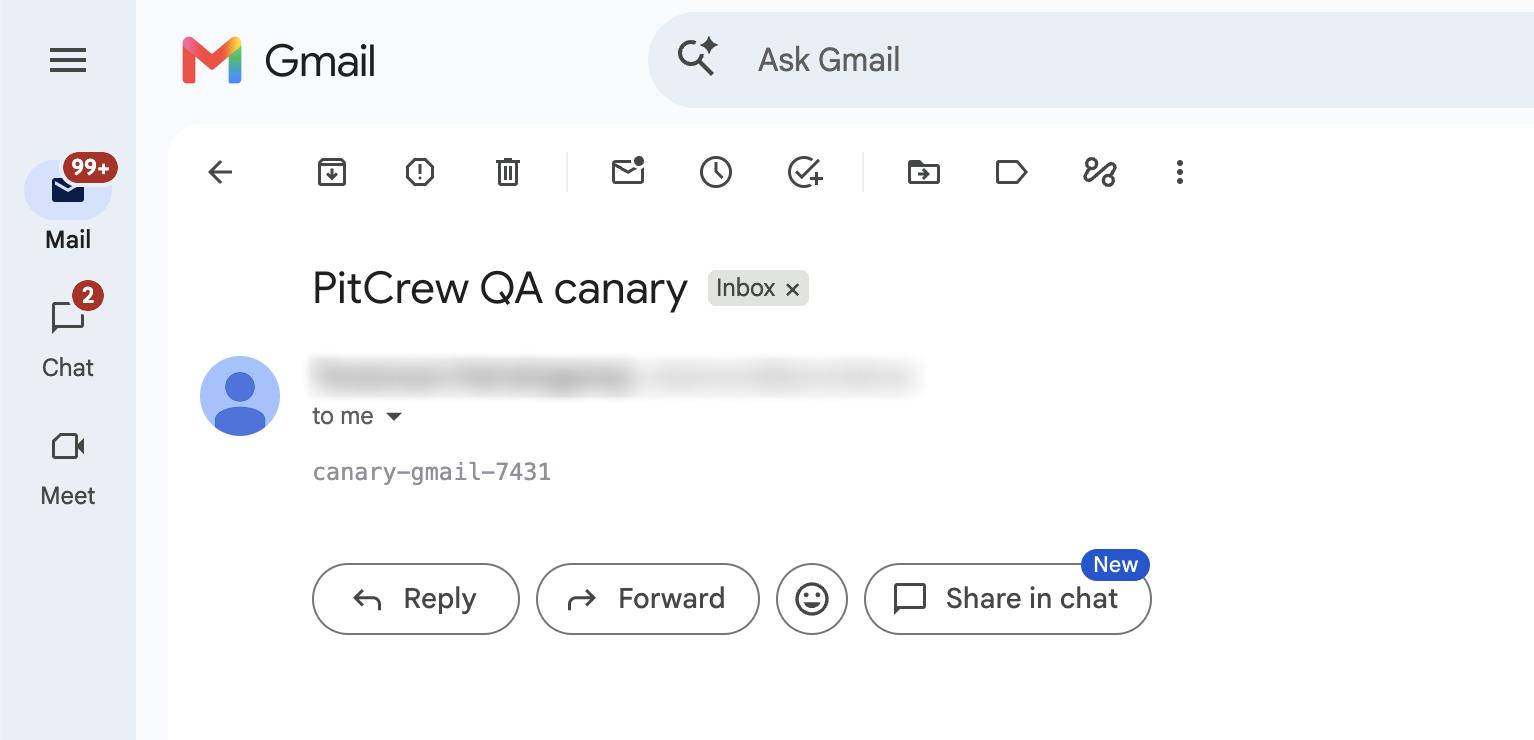
2. Build a tiny, read-only agent. In PitCrew we built an agent with one task: find that email through the Gmail connection. It can read, and nothing else.
3. Write the check. The AI's instructions only get the run started. The success rules belong to code: wait for the run to end, then look for the code word in its output, and confirm the run completed.
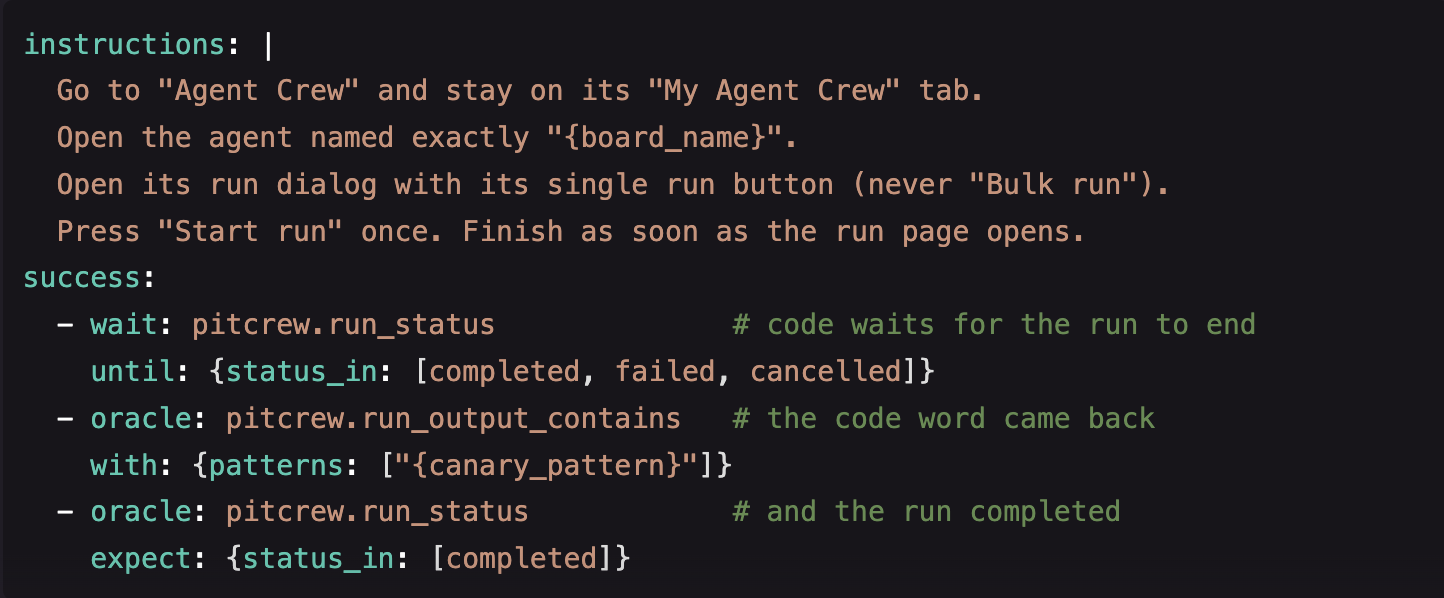
4. Run it. Code signs in and looks up the agent. The browser agent opens it, presses Start run, and its job ends there. Code follows the run through PitCrew's API until it finishes, then searches the output for canary-gmail-7431.
5. Report. The result lands in Google Chat with the other connector checks. In the run below, three of four connectors passed and one timed out, and the card names it.
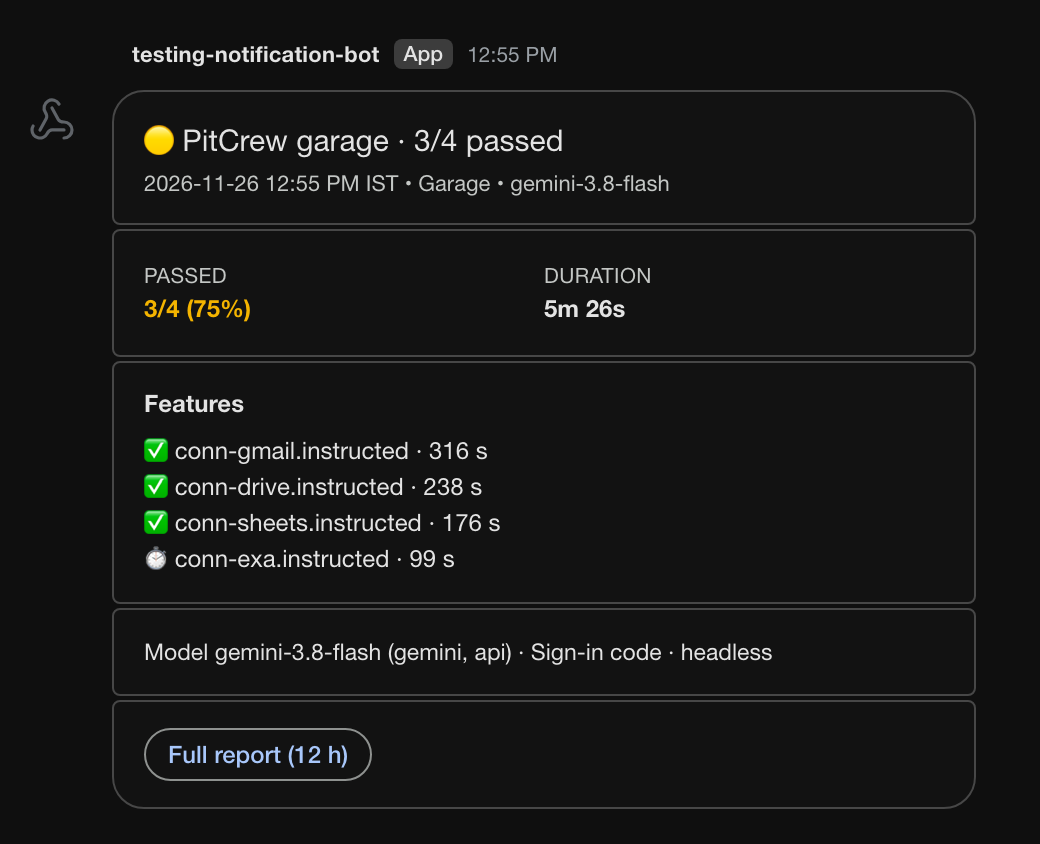
The pattern works for any integration: plant something only the real system could return, then check for it in code. A green badge tells you a connection was set up. A canary tells you it works today.
Anyone Can Write a Test
A test is a short YAML file, written mostly in plain English. If you can brief a new colleague, you can write one. Each test has four fields:
- Steps for the AI, in plain sentences.
- Inputs the agent needs, such as a text field or a file upload.
- Allowed changes: the only things the AI may change in PitCrew.
- Pass checks, picked from a list of 43 that code already knows how to run.
The AI gets the first two fields. The guard reads the third. Code runs the fourth.
Here is a test for our Cash Availability Checker, an agent that flags cash shortfalls in client accounts:
Test: Cash Availability Checker, positions file

Steps for the AI
  1. Open the Cash Availability Checker.
  2. Upload the file "positions.csv".
  3. Start one run.
  4. Wait until the run ends.

Inputs
  - File upload: positions.csv

Allowed changes
  - Start one run of the Cash Availability Checker.

Pass checks
  - The run completed.
  - The page shows: <the text the run must show>
Most changes need no code at all:
| You want to | What it takes | Code? |
|---|---|---|
| Run the same test on another agent | Add one line to the group, with the agent's exact name | No |
| Add a test from existing checks | Write one test file and add it to a group | No |
| Use new sample files | Add the files to the project and list them in the test | No |
| Check something no check reads yet, such as a new page | An engineer writes one small check | A little |
| Let the AI do something new, such as a new kind of upload or a browser extension | An engineer adds a tool for the AI | Yes |
From Laptop to Cloud
A new test goes through three gates before it joins a cloud job:
- Validate. A validator reads every test file before any browser opens, and catches mistakes such as a missing field, a mistyped step name or a variable that doesn't exist.
- Watch it once. All new tests are run locally on a Mac with the browser visible and user can watch the AI work through it to see if the test is as per the expectation.
- Run it in the cloud. Once confirmed, it joins a cloud job for future runs.
One command starts a cloud job, and the log streams live to your terminal. Closing the log does not stop the run. When the run ends, a summary card lands in Google Chat. If a test failed, the card names it and gives the reason, and engineers can replay every step from the saved record.
Cloud jobs also run on a schedule, every day against production. Each run writes a report with every test's result, its one-line reason, its run time and its model cost. The report and the recorded evidence go to a private storage bucket, and the Chat card links to them.
Two cloud jobs exist today, and setting up a new one takes one command.
The First Cloud Runs, in Numbers
Today there are 25 tests in four groups:
- Single runs (4): four of our agents, each started once on sample data. The agent that reads client intake PDFs must also add a row to a Google Sheet.
- Bulk runs (4): the same four agents, each starting many runs at once from uploaded files, up to 8 per agent. Shared inputs are set once for all runs. Per-run inputs, such as each run's own file, are set run by run, so every run stays independent.
- Collections (15), in three parts: prepare (4), use (8) and maintain (3). Create a collection with six files, check that documents and their tabs show the right content, ask questions about it, download a file, then rename and delete.
- App checks (2): the integration pages load, and yesterday's run of one agent can be found. Read only.
On 25 Nov 2026 we ran the first three groups in the cloud as two jobs, twice each. All 23 tests in those jobs passed both times.
| Started (IST) | Job | Passed | Run time | AI steps per test | Tokens in / out |
|---|---|---|---|---|---|
| 16:20 | Single + bulk runs | 8 of 8 | 20 min | 9.8 | 764k / 86k |
| 16:20 | Collections | 15 of 15 | 16 min | 5.5 | 743k / 74k |
| 15:48 | Single + bulk runs | 8 of 8 | 17 min | 9.6 | 765k / 82k |
| 15:48 | Collections | 15 of 15 | 16 min | 5.3 | 726k / 73k |
Three things stand out:
- Collections tests are short. About 5 AI steps each, against nearly 10 for agent runs.
- Bulk runs take longest. The model spends 2 to 4.5 minutes on a bulk test, 1.5 to 2.5 minutes on a single run, and 20 seconds to 2 minutes on a Collections test.
- Token use is steady. Every job used between 726k and 765k input tokens and between 73k and 86k output tokens.
Next Steps
Every run above passed. That shows the browser automation can get through PitCrew's core flows without help. The next step is to break things on purpose and understand how our browser use is able to catch these errors. Upload the wrong file, and confirm that the check fails and the Chat card names the reason.
What We'd Tell Another Team
None of this is specific to financial services. If you're putting a browser agent on your own product, three ideas carry over:
- Let the model drive, never judge. Give the AI the screens and nothing else. Signing in, guardrails and the pass or fail verdict belong to code the AI can't influence.
- Look for evidence, not status. A green badge, a "done" message and a success toast all describe the screen. Read the result from your API, or plant a canary and look for it.
- Make tests cheap to write. A test anyone can write in plain English gets written. A test that needs an engineer waits in the backlog.
How are you testing the agents in your own product? We'd like to compare notes.
See what PitCrew can take off your team's plate
Tell us one task your team does by hand every week. We'll show you the agent that handles it, set up to your firm's rules, with your team approving each step.